
Eviquire for
Forensic experts
Eviquire helps forensic practitioners acquire volatile online material and preserve the source context, examiner activity, hashes, timestamps, custody history, and review outputs needed to explain the collection.
 Web evidence workflows for
Forensic experts
The challenge
Why online evidence needs a defined process
Web evidence rarely behaves like a static file. Pages change during examination, authenticated sessions affect what is displayed, and important material may exist across source resources, network traffic, downloads, video, or expanding feeds.
Relevant sources
Evidence your team may need to preserve
- Live websites and web applications
- Social platforms and authenticated accounts
- Online video, downloads, email, and mobile screens
- Dark-web and threat-intelligence sources
Common scenarios
Where Eviquire fits
- Independent or court-instructed web examinations
- Preservation before takedown, disclosure, or expert analysis
- Technical validation and review of another examiner’s acquisition
Role-specific value
How Eviquire supports forensic experts
Visible, region, full-page, scrolling, crawling, and recording workflows
Raw resources, HTTP exchanges, network context, and downloaded files
Triple hashes, trustworthy timestamps, audit logs, and chain of custody
Acquisition Review, forensic reports, and portable case packages
Recommended workflow
From collection objective to reviewable output
Define the objective
Record the investigative purpose, authority, relevant sources, target dates, access conditions, and collection boundaries.
Prepare the environment
Select the appropriate desktop, cloud, virtual, network, language, and case settings for the source and organizational policy.
Acquire relevant material
Capture the content, interactions, files, media, source context, and technical information needed to explain the finding.
Verify and review
Check hashes and timestamps, review acquisition activity, document gaps or failures, and keep the original evidence package protected.
Report and hand off
Create a clear case record for the authorized reviewer, separating captured facts from analysis, allegations, and conclusions.
See it in the product
Trace the acquisition record during technical review.
For an examiner, the key question is not only what was captured, but which records are available to explain and validate the acquisition. Screenshots show a non-customer demonstration environment; actual outputs depend on the source, workflow, configuration, platform, plan, and permissions.
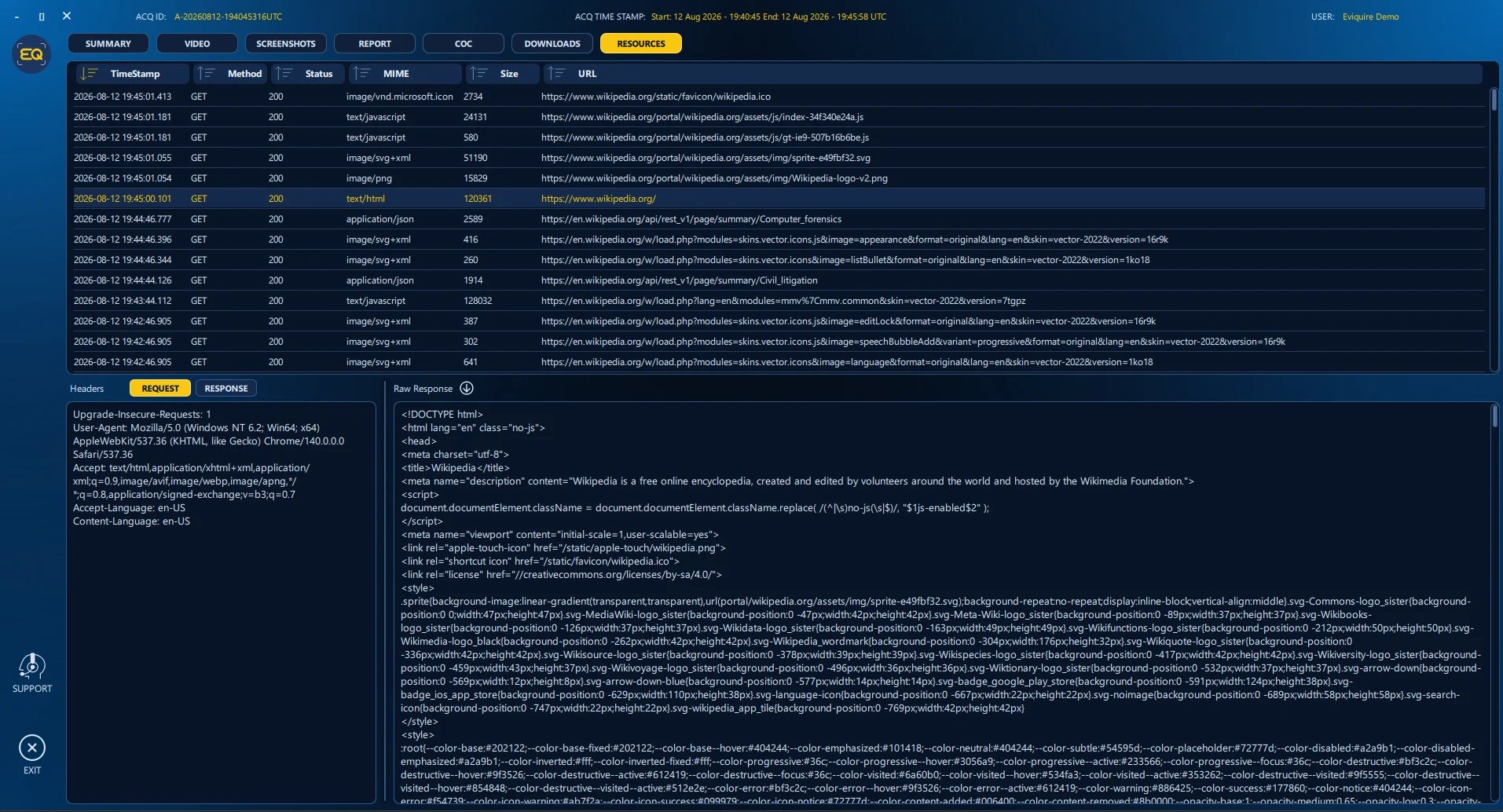
What technical exchanges were recorded?
Review available requests, responses, headers, and resources alongside the visible evidence.
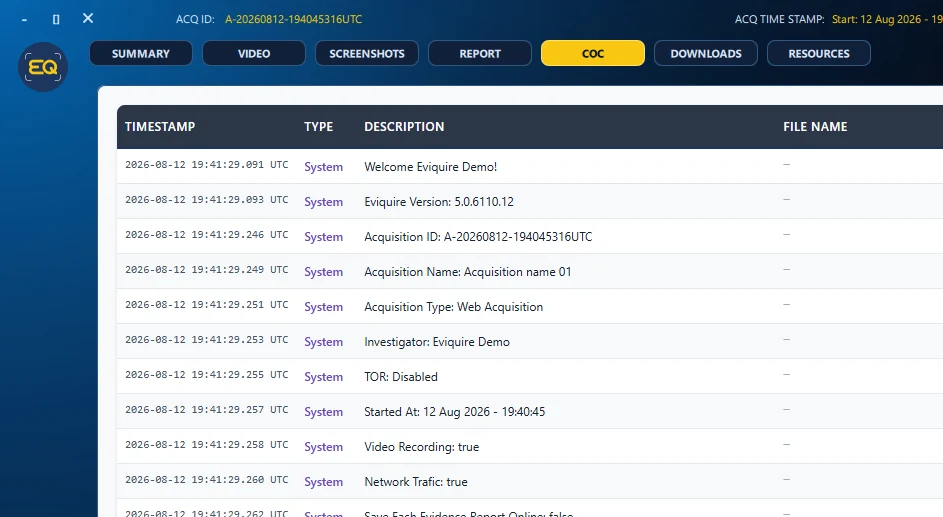
What supports integrity review?
Inspect recorded chain-of-custody events and associated acquisition activity as part of the package review.
Evidence outputs
Material another reviewer can inspect
Eviquire organizes captured content and acquisition records so the collection can be reviewed without relying on memory or a disconnected screenshot.
- Original evidence artifacts and visible captures
- Acquisition settings and activity history
- Integrity and timestamp verification records
- Case summaries and examiner-ready reports
Deployment choices
Select the environment that fits the work.
Desktop
Suitable when the examiner needs local control, virtual-machine support, specialist source access, extended acquisitions, or sensitive case handling.
Cloud SaaS
Suitable for browser-based access and centrally available workflows when source support, policy, sensitivity, and plan limits allow it.
Hybrid or on-premise
Available for teams that require combined workflows, custom limits, controlled infrastructure, or government and enterprise deployment.
A documented process supports—but does not replace—professional judgment.
Eviquire helps preserve selected online material and acquisition records. Your organization remains responsible for authority, scope, validation, privacy, security, interpretation, retention, disclosure, and compliance with the applicable rules.
Frequently asked questions
Can Eviquire replace examiner judgment?
No. It supports acquisition, documentation, verification, and review. The examiner remains responsible for scope, validation, interpretation, limitations, and testimony.
Can another examiner review a case?
Portable case-review workflows and structured evidence outputs can support review, subject to the organization’s access and transfer procedures.