
User manual · Chapter 14
Advanced Features
Use Eviquire browser profiles, cookies, proxies, Tor, PCAP, TLS logs, automation, batch capture, historical comparisons, and recovery.
14.1 Browser Profiles
Eviquire uses a browser profile during acquisition. The profile can preserve cookies, cache, persistent storage, and related browser data. This is important when evidence depends on session state. Forensic value:
- Shows browser context.
- Preserves authentication-related state.
- Supports review of how content was accessed.
- Helps reproduce session behavior in some circumstances.
Risk:
- May contain sensitive cookies or tokens.
- May include private browsing artifacts.
- May create disclosure concerns.
Handle browser profiles as sensitive evidence.
14.2 Cookies And Session Persistence
Eviquire maintains browser state within an acquisition to support navigation and, when authorized, authenticated content collection. Advanced Cookies Collection can preserve cookie observations and lifecycle events. The investigator should not assume cookies or site consent decisions carry across new, isolated acquisitions.
- Use dedicated accounts when possible.
- Avoid personal investigator accounts unless authorized.
- Document login steps.
- Capture logout state if relevant.
- Understand that cookies can be sensitive credentials.
14.2.1 Automatic Cookie Consent Handling
The Version 6 acquisition form provides an Automatic Cookie Consent checkbox and response selection. Use it only when the acquisition protocol specifies a deliberate cookie-banner action. For instance, a public-page investigation that requires minimal interaction can leave the option disabled. If the protocol instead requires a rejected-consent state, enable the option and select Reject all where offered.
Cookie banners and consent frameworks differ between websites. Rules-based handling can reduce manual work but cannot guarantee every banner is detected. A consent response may affect cookies, third-party calls, page appearance, and the evidence collected. Record and review actual consent interaction events; do not infer a successful rejection or acceptance merely from selecting a setting. Automated handling does not authorize unrelated account or data access.
The Advanced Cookies Collection option is separate: it governs cookie artifact collection and should not be confused with automated interaction with the banner.
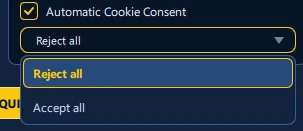
Select Automatic Cookie Consent in the New Acquisition form, then choose Reject all or Accept all from the dropdown. The application attempts the corresponding action only on supported consent dialogs; an unsupported site or modified banner may require user review. Actual automated consent clicks are recorded in Chain of Custody.
Supported-site handling includes major services such as Google, Facebook, Instagram, YouTube, TikTok, and Reddit, subject to site changes. Choosing Reject all does not prove that every optional cookie was refused: verify the visible dialog outcome and captured cookie events where that distinction matters.
14.3 Proxy Routing
Proxy routing can be used to control the apparent network origin of browser traffic. Eviquire records public IP and country information where available. Use proxy routing when the investigation requires:
- Geographic testing.
- Controlled egress.
- Enterprise network routing.
- Separation from investigator workstation IP.
Document all proxy settings.
14.4 Tor Mode
Tor mode routes traffic through Tor where supported. It can affect content, speed, access, and legal interpretation. Use Tor mode only when authorized and appropriate. Record why Tor was used and what exit information was observed.
14.5 PCAP Network Capture
PCAP network capture records packet-level session traffic. Eviquire writes PCAPNG files and TShark logs when configured and supported. Forensic value:
- Supports network timeline analysis.
- Shows domains, IPs, connections, and transfers.
- Helps validate downloads.
- Can support incident response analysis.
Risks:
- May capture unrelated host traffic.
- May contain credentials.
- May contain personal data.
- Can create very large files.
14.6 TLS Key Logs
TLS key logs can support decryption of browser TLS traffic in tools that support key log import. Eviquire writes the SSL key log path into the browser environment. Forensic value:
- Can help analyze encrypted traffic.
- Supports technical validation of browser communication.
Risks:
- Highly sensitive.
- Can expose decrypted session contents.
- Must be protected like credentials or privileged evidence.
14.7 Automation
Automation can create cases, configure acquisition options, launch acquisitions, and close cases according to provided configuration. It is useful for cloud, batch, or repeatable collection workflows. Before using automation:
- Validate the configuration on test targets.
- Confirm case naming and metadata.
- Confirm evidence options.
- Confirm export settings.
- Confirm legal scope for every target.
14.7.1 Recording Engine and Multi-Monitor Considerations
The August 2026 release introduced an FFmpeg-based recording engine, with improvements for targeted window capture and application-focused audio. Visual recording is contextual evidence and should be validated alongside discrete captured artifacts. If multiple monitors are used, maintain consistent display scaling across monitors to avoid recording alignment problems or inaccurate visual interaction markers. Use a short test recording after changing display or audio configuration.
14.7.2 Media Recording and Review
The FFmpeg-based recorder supports application/window-scoped capture and process-scoped audio on supported systems. Recorded click indicators help relate mouse actions to visual events. Multi-monitor use is supported, but consistent display scaling across monitors is recommended to minimize click-coordinate and capture-alignment issues.
Windows builds request protection against routine sign-out, shutdown, restart, and automatic idle sleep while an acquisition is running or finalizing. Operating-system policy and forced shutdown can override these requests. Screen lock and manual Sleep/Hibernate may still occur. Plan for reliable power and storage; protection requests do not make an acquisition immune to interruption.
14.8 Batch Captures
Batch capture lets investigators process multiple URLs or targets. It can optionally cycle through proxies depending on configuration. Best practices:
- Test with a small batch.
- Use clear acquisition names.
- Monitor disk space.
- Review failures promptly.
- Preserve the original URL list.
- Mark processed URLs.
14.9 Historical Website Search and Comparison
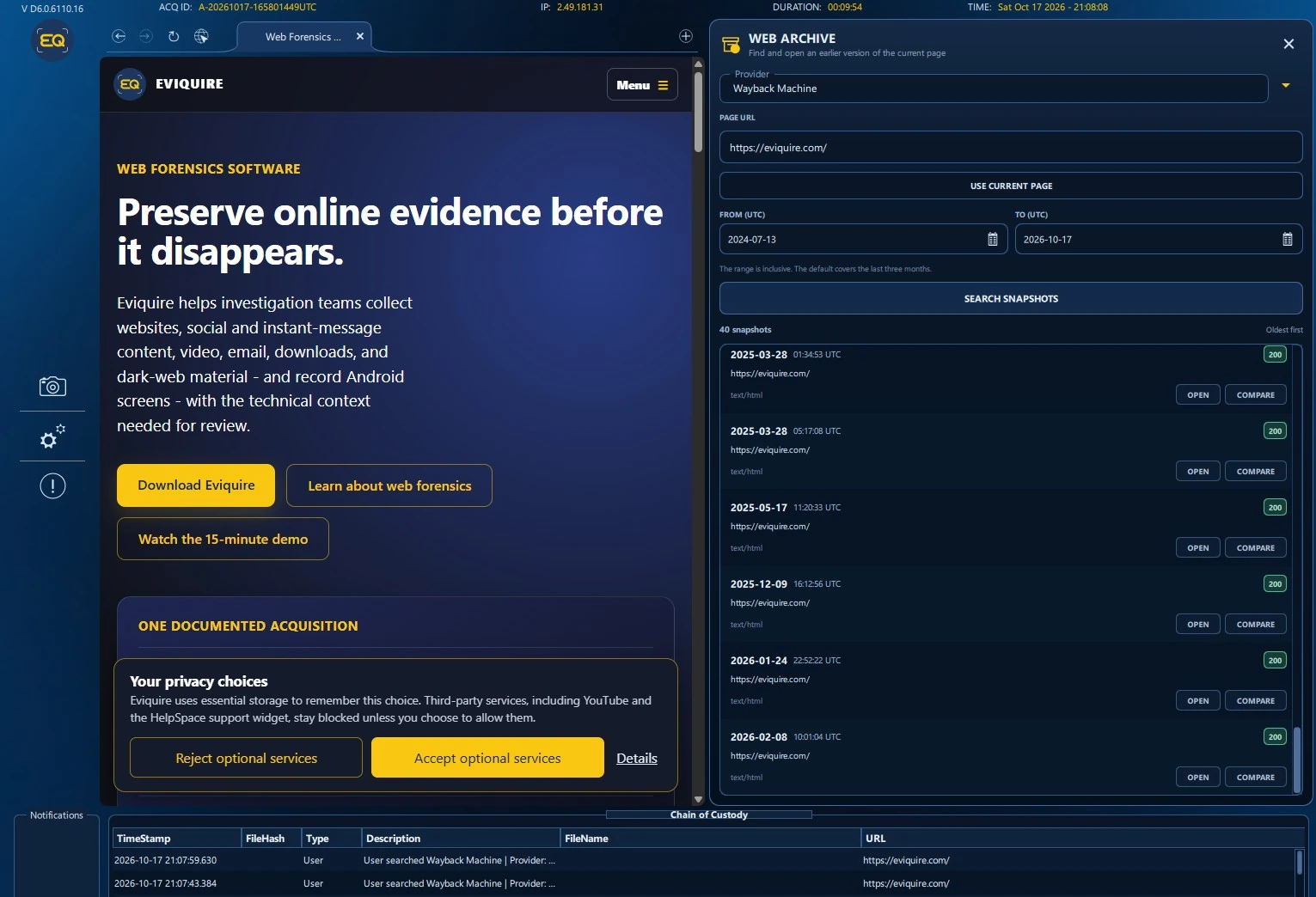
The WEB ARCHIVE panel provides access to historical snapshots from Wayback Machine and Arquivo.pt, subject to provider availability. Open the tool while viewing a target web page; select the archive provider, enter a URL or use USE CURRENT PAGE, and choose the FROM (UTC) and TO (UTC) range.
- Choose the archive provider and the target page URL. Confirm that URL normalization has not changed the intended resource.
- Choose an inclusive date range and press SEARCH SNAPSHOTS.
- Review returned timestamps, archived URLs, resource types, and available response-status indicators.
- Select OPEN to view a historical snapshot or COMPARE to examine historical and current versions side by side.
Archived views can be incomplete or affected by missing resources, crawler exclusions, access limits, or website changes. Record the archive provider and snapshot timestamp alongside the current-page acquisition. Historical content should be preserved using the normal evidence capture workflow if required for the case.
14.10 Acquisition Information and Live Storage Monitoring
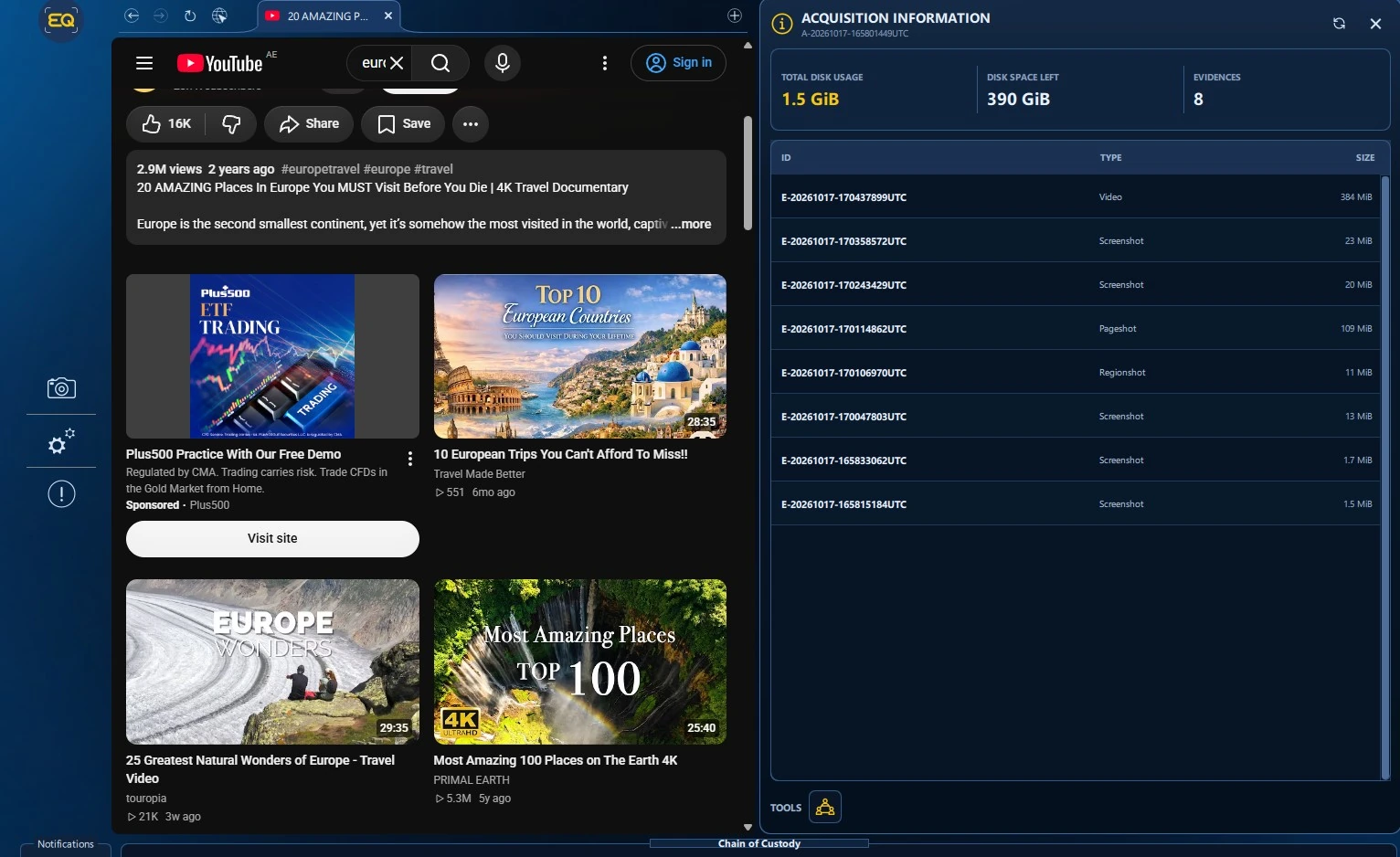
Open the ACQUISITION INFORMATION panel during a live capture to review the acquisition identifier, evidence count, TOTAL DISK USAGE, DISK SPACE LEFT, and the collected evidence list with individual types and sizes. This helps the investigator identify unusually large captures and avoid storage exhaustion during lengthy videos, pageshots, or network collections.
The example shows eight evidence entries, including video, screenshots, a pageshot, and a regionshot. Values represent the illustrated session only. Refresh or reopen the panel when operational decisions depend on current storage status.
14.11 Resilience, Recovery, and Timestamp Handling
Version 6 performs FreeTSA and blockchain timestamp operations in parallel with bounded waits and explicit failure handling. Timestamping problems or interrupted finalization no longer automatically prevent recovery-oriented packaging of collected material. Reports and logs distinguish completed processing from operations that did not finish.
If an acquisition terminates unexpectedly, preserve the partial evidence and diagnostics and use the application’s recovery workflow. Video, Pageshot, and browser shutdown paths have improved timeouts and error handling. Windows diagnostic packages may include relevant crash dumps, logs, and version information; those diagnostics are separate from evidence and are not uploaded automatically.
Important: A recovered or partially finalized acquisition must still be verified. Document any unavailable timestamps, incomplete exports, cancelled operations, or missing artifacts rather than treating recovery as proof that every planned collection task succeeded.