
User manual · Chapter 10
Integrity And Verification
Verify Eviquire hashes, summary records, timestamp files, blockchain anchors, and package integrity without changing original evidence.
10.1 MD5
MD5 is a legacy hash algorithm. Eviquire records MD5 for compatibility with tools and workflows that still display or compare MD5. MD5 should not be relied on alone for modern forensic integrity decisions because collision attacks are known. Use MD5 as a secondary identifier only.
10.2 SHA2-256
SHA2-256 is a modern cryptographic hash and the primary integrity value used in many forensic workflows. Eviquire displays SHA2-256 in reports, summaries, chain-of-custody logs, and hash lists. When verifying exported files, SHA2-256 should be the primary comparison value.
10.3 SHA3-256
SHA3-256 is another modern cryptographic hash algorithm. Eviquire records SHA3-256 alongside SHA2-256. Having both values provides additional assurance and compatibility with different verification policies.
10.4 Hash Comparisons
Eviquire performs hash comparisons at evidence packaging time. It compares files in the evidence directory against the file hashes recorded in the database when the evidence was created. If the SHA2-256 value matches, the hash list records matching status. If it differs, the hash list records a mismatch. Hash mismatch can indicate:
- File modification after capture.
- Incomplete write before hashing.
- Packaging race condition.
- Manual file tampering.
- Tool or filesystem error.
Treat hash mismatches seriously. Review logs, source files, timestamps, and file modification dates.
10.5 Evidence Hash Lists
Evidence hash lists are tab-separated text files. They record:
- Path and filename.
- Created time UTC.
- Last modified time UTC.
- File size.
- Integrity check result.
- Acquisition hash timestamp UTC.
- SHA2-256 at acquisition time.
- SHA3-256 at acquisition time.
- MD5 at acquisition time.
- Packaging hash timestamp UTC.
- SHA2-256 at packaging.
- SHA3-256 at packaging.
- MD5 at packaging.
These files are valuable for technical reviewers because they show both file metadata and integrity comparison state.
10.6 Acquisition And Case Hash Lists
Acquisition and case hash lists record file trees and hashes at broader scope. They provide a manifest of the package contents before archiving and finalization. Use acquisition and case hash lists when verifying:
- All expected evidence packages are present.
- Reports and summaries exist.
- Database files are included.
- File sizes and timestamps are consistent.
- No unexpected files appear.
10.7 Timestamp Authority Files
Eviquire creates timestamp request and response files:
- .tsq: timestamp request.
- .tsr: timestamp response.
These files are generated for summary JSON files. A timestamp response can be validated using compatible timestamp verification tools and the relevant TSA certificate chain. The timestamp proves that a specific summary hash existed at the timestamping time. Because the summary describes the archive and report hashes, it acts as the package integrity statement.
10.8 Blockchain Anchoring
Blockchain anchoring submits a summary hash to an external blockchain-related service or workflow. The resulting metadata is stored with the package. Use blockchain anchoring as an additional proof layer. It should be interpreted together with:
- Summary JSON.
- Hash values.
- Timestamp authority response.
- Chain-of-custody logs.
- Reports.
- Original package file.
10.8.1 Understanding the Celo Reference in the Details Pane
In the illustrated Version 6 interface, the BlockChain Transaction ID field contains a Submitted Hash and a Celo hexadecimal transaction identifier with copy and external-link controls. The submitted hash refers to the recorded integrity summary; the hexadecimal string identifies the blockchain transaction carrying the anchoring reference. Use the displayed copy control when documenting the transaction rather than retyping a long value.
Interpretation: A blockchain transaction establishes an external reference for an anchored hash. It does not directly certify who authored a page, whether a page’s claim is correct, or whether a court will admit the evidence. For complete validation, verify the archive and summary hashes, the signed TSA response when present, and the transaction metadata together.
10.9 Verifying Exported Evidence
To verify an evidence package:
- Preserve the original ZIP.
- Work on a copy.
- Extract the evidence ZIP.
- Locate the summary JSON.
- Read the file information section.
- Compute SHA2-256 of the evidence archive and report.
- Compare values to the summary JSON.
- Validate .tsq and .tsr if timestamp verification is required.
- Review blockchain raw metadata if present.
- Extract the raw evidence archive if file-level review is needed.
- Review the evidence hash list.
- Compare file-level hashes where required.
Investigator Tip: Always record the hash of the exported ZIP before transferring it. That export hash is separate from the internal evidence hashes and helps prove the transferred container was not altered.
10.10 Graphical Acquisition and Case Integrity Verification
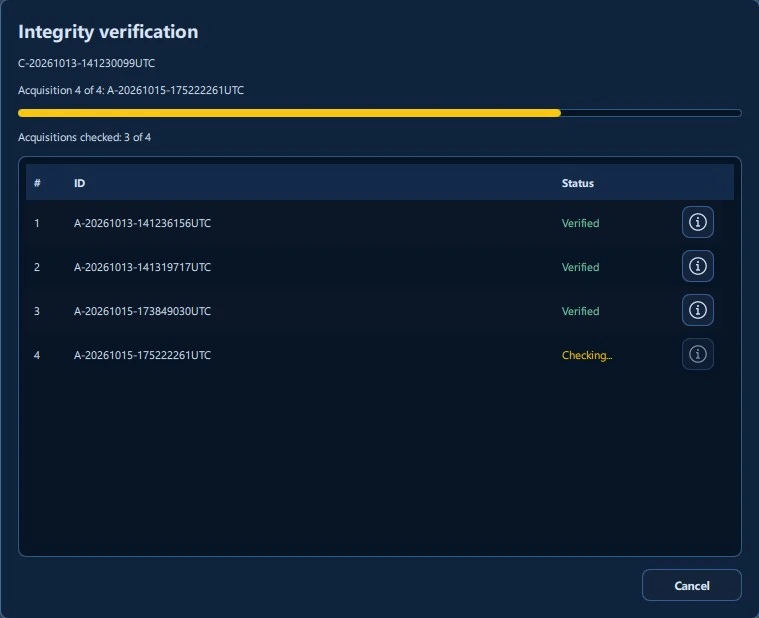
From the Case Manager case context menu, select Verify all acquisitions. Eviquire displays the case identifier, acquisition-by-acquisition progress, and results such as Verified and Checking…. The information button beside a row opens the corresponding detailed acquisition verification result.
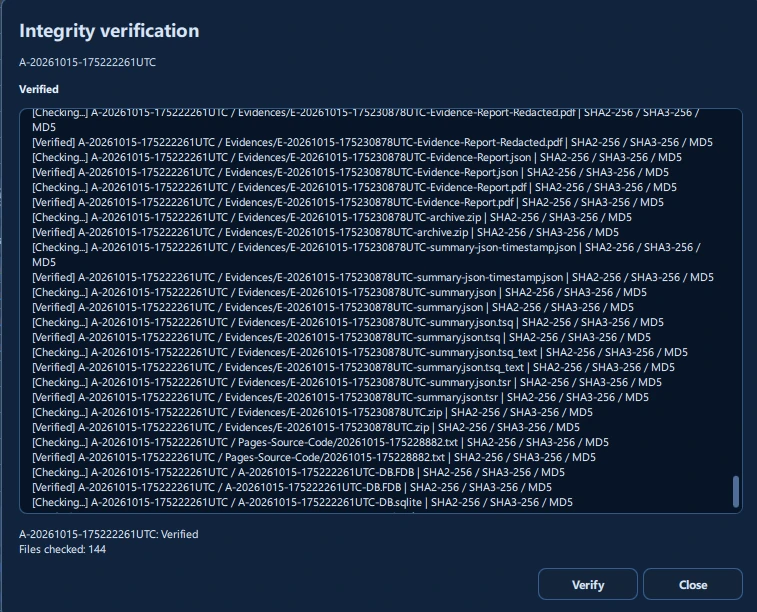
Acquisition verification compares original file inventory and recorded SHA2-256, SHA3-256, and MD5 values as applicable. The result view shows file paths, per-file states, and a count of files checked. In the illustrated example, an acquisition is marked Verified after 144 files were checked. These figures describe only the illustrated sample acquisition.
- Select the case or acquisition to verify. Run the verification operation appropriate to the review scope.
- Monitor the progress display, then inspect any non-verified, unreadable, or missing-file result before relying on the package.
- Open detailed findings and record the verification result in the investigative review record.
- Preserve the original case or acquisition files unchanged. Any analysis, extraction, or retry should use approved review procedures.
Verification meaning: A successful hash comparison indicates that the verified files match their recorded digest values. It does not establish the truth of third-party web content or resolve questions of collection authority or evidential weight.